Snapshot Baseline State (starting point)
Three Ubuntu VMs with working SSH.
Static IPs:
- master = 192.168.1.230
- node1 = 192.168.1.231
- node2 = 192.168.1.232
Each VM must be prepared identically before installing K3s.
Preparation block (run on all three nodes):
sudo apt update && sudo apt upgrade -y
sudo swapoff -a
sudo sed -i ‘/swap/d’ /etc/fstab
cat <<EOF | sudo tee /etc/modules-load.d/k8s.conf
br_netfilter
overlay
EOF
cat <<EOF | sudo tee /etc/sysctl.d/k8s.conf
net.bridge.bridge-nf-call-iptables=1
net.ipv4.ip_forward=1
EOF
sudo sysctl –system
Install the K3s master (192.168.1.230)
curl -sfL https://get.k3s.io | sh –
Retrieve the node token:
sudo cat /var/lib/rancher/k3s/server/node-token
“K106eb5bf24e3e41196847740989002bcc77c1292e2a6354eca5e90edaa321bdc78::server:3d584037826572eb2444c795cba55451”
Configure local kubeconfig:
mkdir -p ~/.kube
sudo cp /etc/rancher/k3s/k3s.yaml ~/.kube/config
sudo chown $USER:$USER ~/.kube/config
Install workers
Run this on k3s-node1 (192.168.1.231) and k3s-node2 (192.168.1.232):
1. Joindre k3s-node1 (192.168.1.231)
Sur k3s-node1 :
curl -sfL https://get.k3s.io | \
  K3S_URL=https://192.168.1.230:6443 \
  K3S_TOKEN="K106eb5bf24e3e41196847740989002bcc77c1292e2a6354eca5e90edaa321bdc78::server:3d584037826572eb2444c795cba55451" \
  sh -
2. Joindre k3s-node2 (192.168.1.232)
Sur k3s-node2 :
curl -sfL https://get.k3s.io | \
  K3S_URL=https://192.168.1.230:6443 \
  K3S_TOKEN="K106eb5bf24e3e41196847740989002bcc77c1292e2a6354eca5e90edaa321bdc78::server:3d584037826572eb2444c795cba55451" \
  sh -
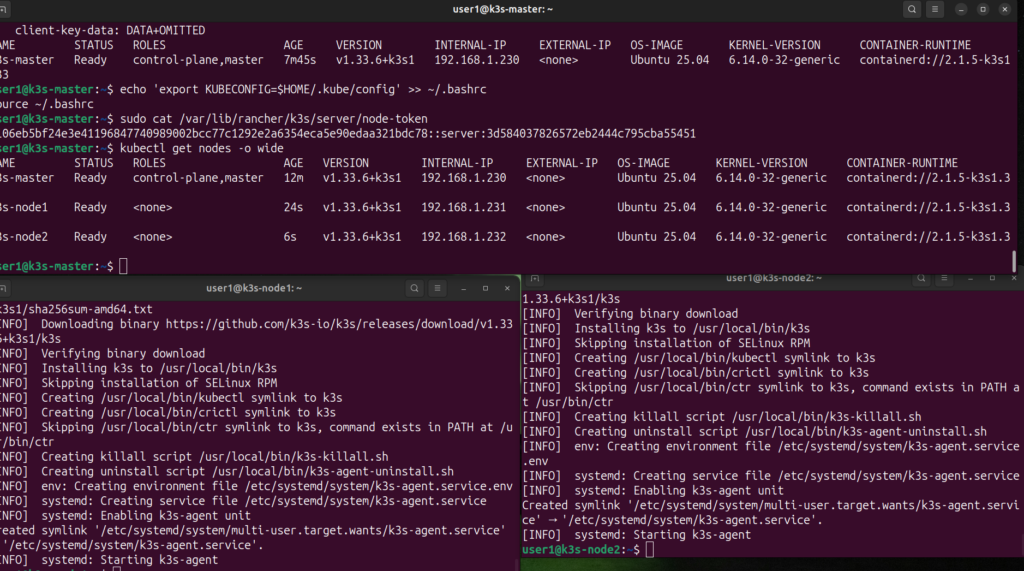
3. Vérification sur le master
Sur k3s-master, en user1 (avec KUBECONFIG=$HOME/.kube/config déjà exporté) :
kubectl get nodes -o wide
Tu dois voir les 3 nœuds en Ready.
github repository:
https://github.com/ahouab/k3s-gitops-lab